
AI for Business Owners: What to Offload (and Protect)
Sixty percent of operators I talk to are quietly terrified they're falling behind on AI. The other forty percent are building automations as fast as they can — and most of them are making their businesses worse.
Here's the thing: AI doesn't fix what's broken. It amplifies it.
If you point it at a clean workflow, you get leverage. If you point it at a broken one, the broken parts get bigger, faster. I spent years inside Uber and Instacart watching this play out at scale. We'd ship something, the dashboard would light up green, and six months later we'd realize we'd perfectly automated the wrong thing.
You — a paving company owner, a climbing gym operator, a real estate broker — cannot afford that mistake. Your margins don't have the cushion a venture-backed tech company has.
So this post is the playbook I'd give you if you hired me to sit in your office for a day. What to offload to AI. What to protect with your life. And how to tell the difference in under 30 minutes.
What does AI actually do for a small business?
AI executes decisions humans have already made. It's fast, tireless, and perfectly obedient — which means it will faithfully execute your bad instructions at scale.
That's the one-sentence answer. Now the unlock.
The question used to be "how do I generate more stuff — more emails, more quotes, more social posts?" AI solved that. Generating is no longer your problem.
Your problem now is selecting the right thing to generate, send, automate, or skip. That selection — that judgment — is what your business actually pays you for. And it's the exact thing most operators are accidentally outsourcing first.
Why does AI make broken businesses worse?
Because AI doesn't know what signal matters. It treats every anomaly the same way and scales whatever you pointed it at — good or bad — until the compounding becomes obvious.
Here's what this looks like in real life:
Your intake form has a vague qualifying question. AI builds you a "smart" follow-up sequence. Now 300 of the wrong leads get nurtured for 60 days.
Your pricing sheet has margin leaks nobody caught. AI generates 40 proposals a week. The leaks just scaled 40x.
Your crew lead writes confusing job notes. You automate them into customer-facing updates. Now every client is confused, consistently.
None of that is an AI problem. That's a you-didn't-fix-the-upstream-thing-first problem. AI just made the consequences louder.
This is why the operators crushing it right now aren't the ones with the most automations. They're the ones who know exactly what their business is good at and refuse to let a tool touch it.
When should a small business use AI? (And when should you walk away?)
Use AI when stakes are low and the task is repetitive. Walk away when stakes are high or the task depends on your judgment, relationship, or taste.
That's the rule. Let me show you how to apply it.
Every task in your business belongs on a 2x2 grid. One axis: how high are the stakes if this goes wrong? Other axis: how much does it matter that YOU specifically are doing it?
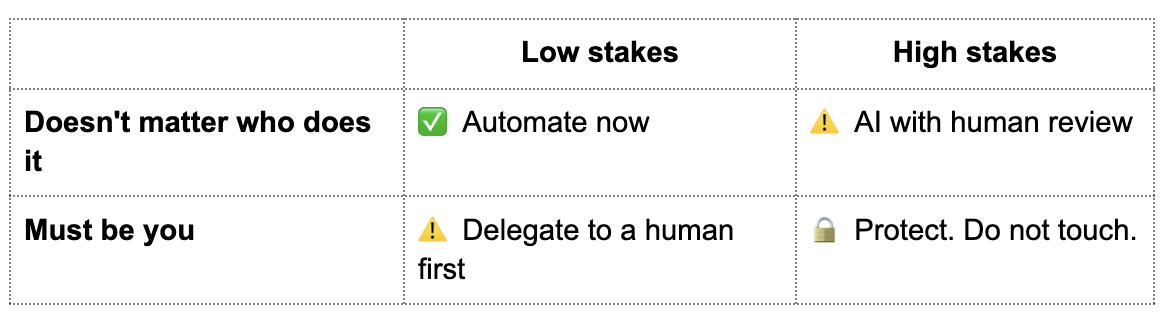
The top-left quadrant is your gold mine. Bookkeeping categorization. Appointment reminders. First-pass email drafts. Meeting notes. These run whether you show up or not — and most of you are still doing them manually.
The bottom-right quadrant is your edge. The call a top real estate agent makes on the day her client bought their first home. The quote a drywall contractor walks through in person with a builder he's worked with for 15 years. The read a gym owner has on a member who's about to quit.
Protect the bottom-right with your life. That's where your business lives.
What should Main Street operators automate first?
Start with the bottom of your inbox: recurring admin, data entry, scheduling, first-draft writing, and routine customer communication. These are high-volume, low-judgment tasks.
Here's a starter list by operator type:
Contractors and trades
Job proposal first drafts (you still approve)
Customer appointment reminders and pre-visit prep
Weekly invoice follow-ups
Material order lists from past job data
Gyms and studios
Member onboarding email sequences
No-show rebooking flows
Class waitlist management
Monthly member engagement reports
Real estate
Listing description drafts
Past-client check-in scheduling
Showing feedback summaries
MLS data cleaning
Retail and specialty
Inventory reorder alerts
Customer review response drafts
Social media captions (from product info)
Weekly sales pattern summaries
Notice what's NOT on those lists: the first conversation with a new client, the pricing judgment call, the "something's off" read on an employee, the crew-level trust-building. That's the work AI can't do because it doesn't have the context.
What should you never let AI touch?
Never let AI handle relationship-critical moments, judgment calls with asymmetric downside, or anything that requires reading context only you can read. These are your edge.
Three categories of work to protect, always:
1. The "something's off" moments. A client goes quiet. A crew member's work slips. A repeat customer stops coming in. AI will miss it entirely because nothing looks wrong in the data. You notice because you've seen the shape of things for 15 years. That pattern recognition is not a bug in your brain — it's the muscle. Don't let it atrophy.
2. The high-trust conversations. The call where a luxury builder trusts you with a $400k project. The text to a long-term employee navigating a hard season. The pricing conversation with a client who's been with you through two recessions. A generic AI-drafted message burns that trust in one read. You can smell it.
3. The taste calls. How your emails sound. How your shop looks. Which jobs you take. Which clients you fire. Your taste is what makes your business yours and not the paving company two towns over. The moment you outsource that to a model that's been trained on the average of everyone, you become the average of everyone.
I worked with a luxury residential drywall contractor recently whose first instinct was "help me automate scheduling." Simple enough. But the more we talked, the more I understood the real problem: his crew was his edge. Fifteen years together. When work slowed down seasonally, he personally kept them fed — emotionally and financially. That relationship was the whole business.
What we actually needed to protect wasn't his scheduling. It was the trust that held the crew together through the slow months. No AI tool can build that. The fix wasn't an AI tool — it was a pricing model that evened out his revenue so he could keep the crew paid year-round.
That's what you protect.
How do I figure out what to automate in my business this week?
Run the Operator Triangle on one part of your business — Customer Reality, Delivery Reality, or Business Reality. List every task. Sort onto the 2x2. Start automating the top-left.
Thirty minutes. No software. No consultant.
Step 1. Pick ONE area of your business. Not the whole thing. Customer onboarding. Job closeout. Weekly ops review. Something discrete.
Step 2. List every task inside it. Every email, every handoff, every decision, every form, every follow-up. Be granular. You're looking at maybe 20-40 tasks for most areas.
Step 3. For each task, ask two questions:
How high are the stakes if this goes wrong?
How much does it matter that I specifically do it?
Step 4. Sort them onto the grid from earlier. Top-left quadrant is your first automation batch. Bottom-right is what you protect.
Step 5. Pick your top three top-left tasks and build the automations this month. Not this quarter. This month.
The operators who win the next five years are not the ones with the biggest tech stack. They're the ones who know exactly which three tasks to automate and which three to protect. Full stop.
What AI tool should I start with?
For most Main Street operators: ChatGPT or Claude (free tier works), plus whatever scheduling and CRM tool you already use. Don't buy new software until you've mastered what's in front of you.
Most operators I meet have five tools with overlapping features and use 10% of any of them. Adding a sixth doesn't fix that.
Start with a chat-based AI (ChatGPT or Claude) for first drafts, summaries, and thinking out loud. Get fluent. Then look at the automation layer inside tools you already own — your CRM, your scheduling system, your accounting software. Most of them have AI features built in that you're already paying for.
The sophistication is not in the tool. The sophistication is in knowing what to point it at.
Your edge is still your judgment
The power gap between a venture-backed tech company and your business just collapsed. For the first time, a paving company with 12 employees can access the same intelligence layer that used to cost a Fortune 500 company $500k a year.
That's the opportunity. But here's the trap: when everyone has the same tools, the tools stop being the advantage. Your taste, your judgment, your relationships, your read on the business — that's the advantage. That's what you protect.
The operators who remember that will run circles around the ones chasing the next AI hack.
Want to hear how I actually walk operators through this process? I built a private podcast for operators who want to think through AI, systems, and growth without the noise. It's honest, unpolished, and built for people running real businesses.
Or if you'd rather see where the biggest margin leaks are hiding in your business first, the Free Profit Leaks Field Guide is the place to star